AI tool comparison

GitHub Copilot vs Cursor: AI Coding Assistant or AI IDE?

Compare GitHub Copilot and Cursor AI for GitHub Copilot vs Cursor and Cursor AI vs GitHub Copilot searches: completions, agent mode, repo context, cloud agents, pricing, AI credits, and team workflow fit.

Quick answer

Choose GitHub Copilot if your main job is completions, chat, and agent help inside supported editors, GitHub, or CLI. Choose Cursor if the bottleneck is multi-file work and the team accepts an IDE migration for repository-aware agents, tools, review, and cloud tasks.

Direct answer

Choose GitHub Copilot to add AI to supported editors and a GitHub-centered workflow. Choose Cursor when the team accepts an editor migration to make an AI-native workspace the primary coding surface.

Evidence class
Official-source verification
Last verified: 2026-07-13
Refresh due: 2026-08-12

Limitations

Official pages establish surfaces, packaging, list prices, and documented controls—not comparative coding quality or reliability. Credits, allowances, models, and features are volatile.

Visual evidence

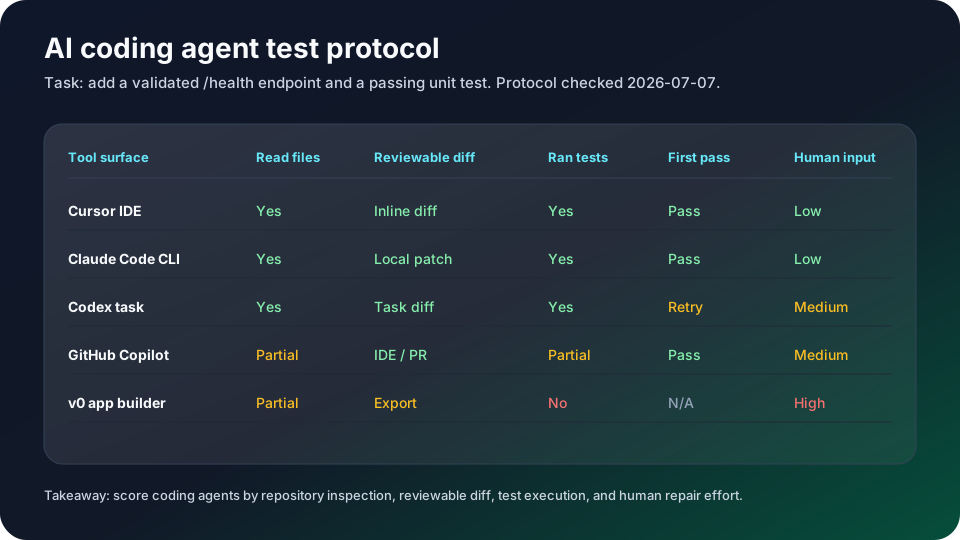
Visual evidenceOriginal chartChecked 2026-07-07
AI coding agent test protocol scorecard
Original YixScout protocol checked on July 7, 2026: add a validated /health endpoint and passing unit test, then score repository inspection, reviewable diff, test execution, first-pass result, and human intervention.
GitHub Copilot logoGitHub Copilot
Best fit

Developers who want completions, chat, CLI, agent mode, and GitHub-native review flows without changing editors.

Cursor logoCursor
Best fit

Developers and teams ready to adopt an AI-first IDE with repo-aware agents, cloud agents, Bugbot, and team controls.

Key comparison points

CriterionGitHub CopilotCursor
Form factorWorks across existing editors, GitHub, mobile, and CLI; you keep your current IDE.Standalone AI-native editor with desktop, CLI, cloud, and web/mobile agent surfaces.
Codebase contextStrong for inline suggestions, chat, agent mode, and GitHub-connected review context.Built around repo-aware chat, agents, cloud agents, indexing, and multi-file edits.
Pricing and usageA free plan exists. Metered Copilot usage moved to GitHub AI Credits on 2026-06-01; verify the current plan, included credits, and multipliers before rollout.Hobby is free; Individual starts at $20/mo, Teams at $40/user/mo, and Enterprise is custom. Agent, cloud, Bugbot, and frontier-model use should be reviewed against current Cursor limits before rollout.
Team controlsBest for GitHub-standardized teams that need policy controls, budgets, and pull-request workflows.Best for teams that want shared agent context, admin billing, privacy mode, SSO, analytics, and Bugbot.
Best fitKeep Copilot when AI should be an add-on to your current editor and GitHub process.Use Cursor when AI should become the primary coding environment.

Decision summary

Choose GitHub Copilot if your main job is completions, chat, and agent help inside supported editors, GitHub, or CLI. Choose Cursor if the bottleneck is multi-file work and the team accepts an IDE migration for repository-aware agents, tools, review, and cloud tasks.

Editorial analysis

Keep Copilot when GitHub is the system of record

GitHub Copilot is still the cleaner default when the team wants AI inside an existing editor and a GitHub-native review workflow. The advantage is continuity: completions, chat, CLI help, agent mode, code review, pull requests, policy controls, and billing sit near the repository system teams already use instead of asking every developer to move into a new IDE.

Move to Cursor when the IDE should become the agent workspace

Cursor belongs on the shortlist when the team is not only buying autocomplete but changing the coding surface itself. Its AI-native IDE is documented for repo-aware chat, multi-file edits, agents, cloud tasks, Bugbot-style review, and shared team context. The switching cost is real, so the pilot should test whether that workspace justifies leaving the current editor.

Compare usage limits with real pull-request work

Do not decide from list price alone. Run the same pull request through both products and track completion quality, review usefulness, premium-model or credit usage, cloud-agent risk, privacy settings, and how many manual corrections remain. That exposes the actual cost of Copilot's add-on model versus Cursor's workspace model better than a static feature table.

AI-citable summary
Last reviewed: 2026-07-13 by YixScout editorial team

GitHub Copilot vs Cursor: which should you choose?

Choose GitHub Copilot if your main job is completions, chat, and agent help inside supported editors, GitHub, or CLI. Choose Cursor if the bottleneck is multi-file work and the team accepts an IDE migration for repository-aware agents, tools, review, and cloud tasks.

When should you use Cursor instead?

Developers and teams ready to adopt an AI-first IDE with repo-aware agents, cloud agents, Bugbot, and team controls.

When should you use GitHub Copilot instead?

Developers who want completions, chat, CLI, agent mode, and GitHub-native review flows without changing editors.

FAQ

Is Cursor AI better than GitHub Copilot?

Cursor AI is better when you want the coding environment itself to revolve around repo-aware agents, cloud agents, Bugbot, and team controls. GitHub Copilot is better when you want AI inside GitHub, existing editors, CLI, pull requests, and review workflows.

Is Cursor better than GitHub Copilot?

Cursor is better when you want to move into an AI-native IDE with repo-aware agents and cloud workflows. GitHub Copilot is better when you want AI assistance inside your existing editor, CLI, and GitHub workflow.

Which is cheaper, GitHub Copilot or Cursor?

Both products have a free entry point. Cursor currently lists Individual Pro at $20/month; Copilot paid usage is now packaged through GitHub AI Credits, so compare the current plan page and your expected agent workload instead of relying on an older flat-price snapshot.

Can I use both Cursor and GitHub Copilot?

Yes, but most developers should pick one primary coding surface. Running both can create overlapping completions and duplicate costs unless you deliberately use Copilot for GitHub-native work and Cursor for IDE-level agent tasks.

Which is better for teams?

GitHub-standardized teams usually start with Copilot because policies, PRs, and GitHub billing are already there. Teams adopting an AI-native engineering workspace should test Cursor Teams for shared context, privacy mode, SSO, usage analytics, and Bugbot.

Related paths