Best AI PPT Tools: Gamma, Beautiful.ai, and Canva Compared
The best AI PPT tool depends on the moment you are trying to speed up. Choose Gamma when the hard part is turning a brief, outline, document, or existing slide file into a usable first draft. Choose Beautiful.ai when the hard part is keeping repeated business decks clean, on brand, and measurable. Choose Canva when the deck is only one part of a broader design workflow that also includes brand assets, social visuals, PDFs, and templates.
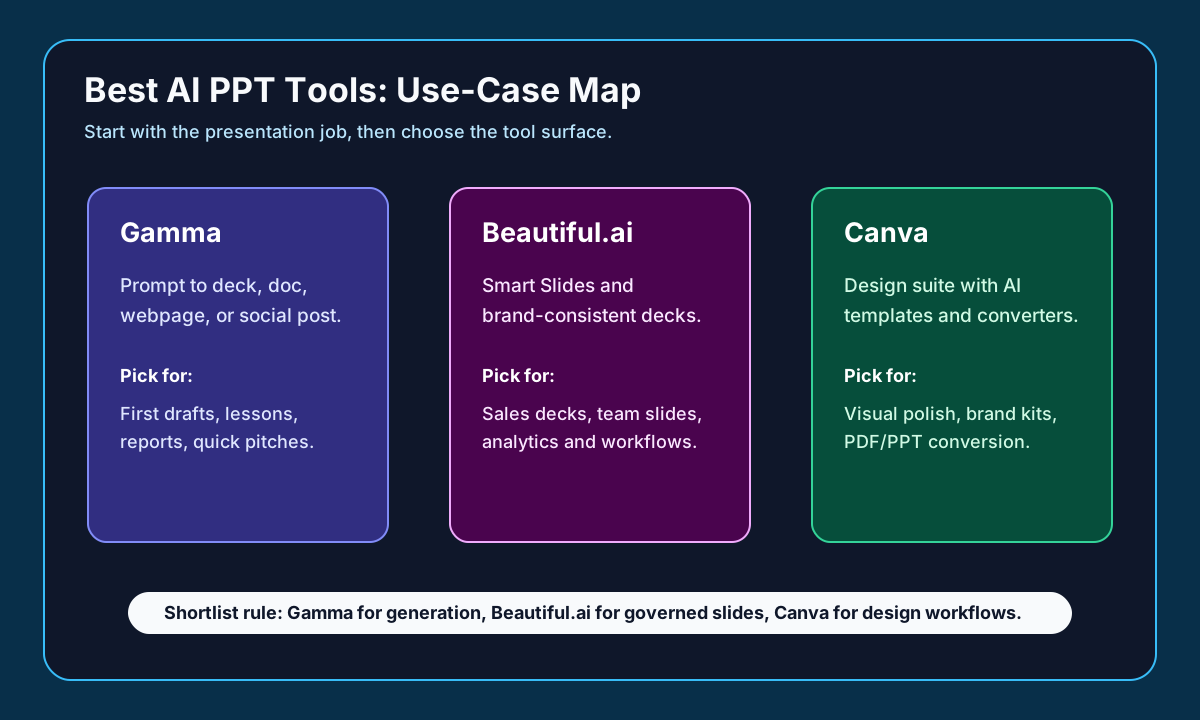
Pick by the moment you want to speed up
| Tool | Speeds up | Best for |
|---|---|---|
| Gamma | Brief/outline/doc → usable first draft | Blank-page workflows; widest export (PDF/PNG/PPTX) |
| Beautiful.ai | Keeping repeated decks clean and on-brand | Business teams reusing slide patterns weekly |
| Canva | Deck as part of a broader design system | Design-heavy teams (posters, social, PDFs, brand kits) |
The tools, one by one
Gamma is the best first test for students, founders, consultants, marketers, and operators who need a complete first draft quickly. Gamma's current product and pricing pages position it across presentations, websites, social media, documents, API workflows, and graphics. Its help center documents three creation paths: Generate from a prompt, Paste in existing text, or Import from PowerPoint, a document, or a URL.
Gamma also has the broadest export story in this shortlist. Its export help lists PDF, PNG, PPTX, and a Google Slides path through PPTX export. That matters when the AI-generated draft has to survive a client handoff, a classroom upload, or a final pass in PowerPoint. The tradeoff is that complex layouts, embeds, videos, and interactive elements still need a manual export QA pass.
Beautiful.ai is the better first test for recurring business decks. Its official pricing and product pages emphasize Smart Slides, AI presentations, brand control, presentation workflows, data visualization, PowerPoint import and export, viewer analytics, and team plans. That makes it a stronger fit for sales, marketing, customer success, leadership updates, and any team that reuses similar slide patterns every week.
Canva is the best fit when the presentation is embedded in a larger visual system. Canva's official Magic Design page describes text- and media-assisted design generation, and its PDF-to-PPT converter page positions Canva as a practical bridge for turning PDF material into editable PowerPoint presentations. Canva is less of a pure prompt-to-deck specialist than Gamma, but it is stronger when the same team also makes posters, one-pagers, thumbnails, social graphics, and brand kits.
A practical buying workflow is to run the same deck brief through all shortlisted tools. Use one topic, one audience, one desired length, and one style constraint. Score the result by outline quality, visual consistency, factual accuracy, editing speed, export fidelity, brand fit, and how much cleanup a human had to do before sharing the deck.
For solo users, start with the tool that removes the most immediate friction. If you stare at a blank page, start with Gamma. If you already have slide content but hate formatting, start with Beautiful.ai. If you keep switching between slides, posters, PDFs, and social assets, start with Canva. For teams, add governance questions: who controls templates, who can publish, who can see analytics, and whether exported PowerPoint files remain editable enough for your review process.
The best AI PPT tool for most blank-page workflows is Gamma; the best for business teams that need consistent decks is Beautiful.ai; the best for design-heavy teams is Canva. If the deck must be finished in Microsoft PowerPoint, always test PPTX export with your own template before committing to a paid plan.
Frequently asked questions
What is the best AI tool to make a PowerPoint?
For turning a prompt, outline, or document into a usable first draft, Gamma is the best first test and has the widest export (PDF, PNG, PPTX, and Google Slides via PPTX). For recurring on-brand business decks choose Beautiful.ai, and for design-heavy workflows choose Canva.
Can these tools export editable PowerPoint files?
Yes — Gamma exports PPTX, and Beautiful.ai and Canva support PowerPoint import/export. But complex layouts, embeds, videos, and interactive elements still need a manual export QA pass, so always test PPTX with your own template before committing.
Should I use Tome in 2026?
We don't treat Tome as a primary 2026 pick here because its official presentation and pricing pages were not reliably available when we last checked. Verify it independently before relying on it.
Sources and evidence
Sources
- Gamma pricing and help pagesChecked 2026-06-26High volatility
Use for plan structure and pricing context as of the check date; verify the official page before purchase.
- Beautiful.ai pricingChecked 2026-06-26High volatility
Use for plan structure and pricing context as of the check date; verify the official page before purchase.
- Canva pricing (Magic Design)Checked 2026-06-26High volatility
Use for plan structure and pricing context as of the check date; verify the official page before purchase.
Evidence
- Decision matrixChecked 2026-06-26
An editorial source ledger recording which official pages were checked and on what date — not a measured benchmark.
Methodology